Ultra-Fast Offline Photo Management Software for Windows
Overview
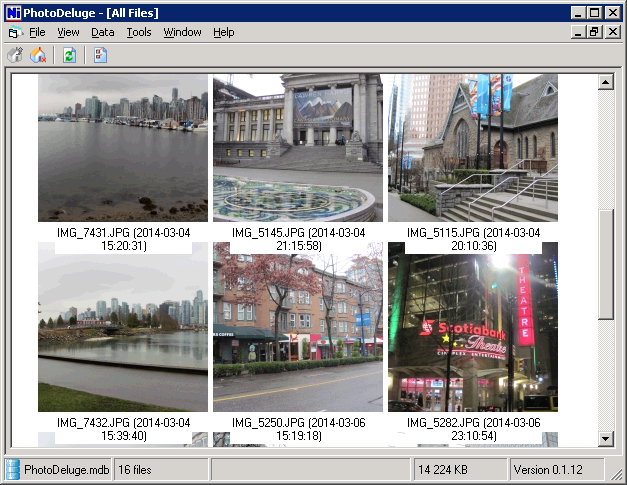
PhotoDeluge is an offile photo management application that is designed for Windows 95 and up. It is lightweight and runs super fast on your computer with minimal resources. It manages huge librairies of photos without slowdown. Keep all your files locally on your computer and don't rely anymore on expensive cloud-based storage.
Features
- Runs on Windows 95/98/ME/NT/2000/XP/Vista/7/8/10/11
- Manage all your files locally
- NO cloud required (keep your privacy and save money)
- Multi-languages (English & French)
- Small executable of about 400kb
- Low memory usage
- Can handle large librairies of photos (100,000+ photos)
- Scroll and view your medias easily
- Manage your photos into albums
- Pay a one-time fee to purchase
- Includes one year of free updates
Purchase
Download and try our Shareware version for free (30 days). If you want to keep PhotoDeluge, you must buy a license. After you complete the payment, we will send your license key by email.
Purchase coming soon!
Installation Tips
For older computers, the following steps might be required to run PhotoDeluge:
- VB6 Run-Time is required. On error message "msvbvm60.dll" or "OLEAUT32.DLL", install vbrun60sp6.exe and reboot.
- On error message "Computer is missing the required database file DAO360.DLL", do these steps:
- install dcom95.exe (DCOM95 for Windows 95) and reboot
- install mdac_typ.exe (Microsoft Data Access Components 2.5 SP3 Setup) and reboot
- copy file dao360.dll (Microsoft DAO 3.6 Object Library component) to "c:\Windows\System\" and run command "regsvr32 c:\Windows\System\dao360.dll"
- On error message "Run-time error 48: file not found: shfolder", copy file shfolder.dll (Shell Folder Service Library) to "c:\Windows\System\"
- On error message "Run-time error '339': Component 'mscomctl.ocx' not correctly registered: a file is missing or invalid.", copy file mscomctl.ocx (Microsoft Windows Common Controls 6.0 library) to "c:\Windows\System\"
- On error message "Computer is missing the required image file GDIplus.dll", copy file gdiplus.dll (Graphics Device Interface Plus, GDI+) to "c:\Windows\System\" and run command "regsvr32 c:\Windows\System\gdiplus.dll" (it might display a warning, but should work)
YouTube
Subscribe to our YouTube channel to follow release information.
©2026 D2Soft Technologies Inc. All rights reserved.